

Article content updated: 2026-09-23 | Information checked: 2026-09-23
When glo HYPER PRO Won’t Charge
First, check the device, USB-C port, and cable for foreign objects or visible damage, then test again with another compatible cable and power source. Because charging indicators and reset procedures vary by model, do not use instructions meant for glo models other than HYPER PRO. If the issue persists or if there is abnormal heat or damage, stop using the device and contact official support.
glo Official Support & FAQ // glo Official Contact // Troubleshooting Guide by Model
Official support information verified: 2026/9/23. The above is a general visual check and not a manufacturer diagnosis.
Good evening, I am Genki, a heated cigarette blogger.
Charging problems are unavoidable when using heated cigarettes. Have you ever experienced the problem of not being able to charge the battery even though you think it is charging?
In this article,Thorough explanation of why the Glow Hyper Pro cannot be charged and how to fix it..
Include content on charging problems in Glow HyperPro,The ability to display a variety of information on the displayThe system is equipped with a
This article will help you solve charging problems and continue to use Glow Hyper Pro with peace of mind.
Also, to learn more about Glow HyperPro, please visit

- Causes and remedies for Glow Hyper Pro not recharging
- Causes of Glow Hyper Pro not charging and remedy 1: Device temperature is too high or too low.
- Cause and remedy for Glow Hyper Pro not charging (2): Some abnormality occurs in the device.
- Cause and remedy for Glow Hyper Pro not charging (3): unrecoverable error on the device.
- Causes of Glow Hyper Pro not charging and remedy 4: Battery life
- If the Glow Hyper Pro is charging properly
- What to check when the Glow Hyper Pro is not charging
- Summary: If the Glow Hyper Pro does not charge, take appropriate action according to the display indication.
- How Was This Flavor?
- Check prices and compatible devices
Causes and remedies for Glow Hyper Pro not recharging

The Glow Hyper Pro has a function that displays a variety of information on the display, including trouble conditions during charging.
If some trouble occurs, the upper part of the display is displayed, and the symptoms are indicated below it.
First, we summarize the display indications related to charging problems and the possible causes and remedies for each.
| Display Indication | Possible Causes | approach |
|---|---|---|
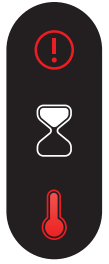 | Device temperature is too high | Wait until the device temperature drops, Or move to a cooler location. |
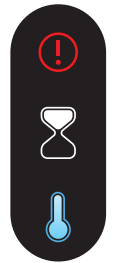 | Device temperature too low | Move the device to a warmer location |
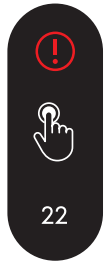 | Device has some abnormality | Reset device to default settings [Reset method]. Turn the dial to "OFF" and press the control button Press and hold for 22 seconds. |
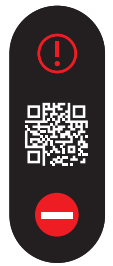 | Device has an unrecoverable error | Device needs to be replaced. Contact our Customer Support Team |
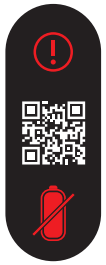 | Battery life | Battery is nearing end of life. Considering device replacement |
Each of these will be explained.
Causes of Glow Hyper Pro not charging and remedy 1: Device temperature is too high or too low.
| Display Indication | Possible Causes | approach |
|---|---|---|
| Device temperature is too high | Wait for the device to cool down. Or move to a cooler location. |
| Device temperature too low | Move the device to a warmer location |
On the top row of the displayWhen an hourglass is displayed in the middle row and a thermometer in the lower row, it indicates that the device has experienced a temperature anomaly.
What to do in this case,Stop charging and wait a few minutes for the temperature of the product itself to settle.
The Glow Hyper Pro.Appropriate temperature is 15°C to 25°CIn,0°C to 40°C during charging(Source: glo official).
Charging at temperatures below 0°C or above 40°C, and use or storage at temperatures below -10°C or above 40°C may damage the product itself or the batteries..
Be especially careful in places where they are prone to high temperatures (e.g., in a car in mid-summer), as they generate heat even when properly charged.
Cause and remedy for Glow Hyper Pro not charging (2): Some abnormality occurs in the device.
| Display Indication | Possible Causes | approach |
|---|---|---|
| Device has some abnormality | Reset device to default settings [Reset method]. Turn the dial to "OFF" and press and hold the control button for 22 seconds. |
On the top row of the displayIf the hand pressing the button in the middle row and the number 22 in the lower row are displayed, it indicates that some abnormality has occurred in the device.
What to do in this case,Resetting the product itself may solve the problem.
After the reset is completed, charging the battery may be possible normally, so try resetting the product itself first.
- How to reset the product itself
- Set the dial to "OFF
Press and hold the control button below the display for 22 seconds.
If you stop long-pressing during the countdown, the countdown will start over from the beginning.
Also note that if the reset is not performed with the dial set to "OFF", the device may boot up without a successful reset.
Cause and remedy for Glow Hyper Pro not charging (3): unrecoverable error on the device.
| Display Indication | Possible Causes | approach |
|---|---|---|
| Device has an unrecoverable error | Device needs to be replaced. Contact our Customer Support Team |
On the top row of the displayIf a QR code is displayed in the middle of the screen and a red circle with a white horizontal line (a symbol that closely resembles a traffic sign prohibiting vehicles from entering the area) is displayed in the bottom of the screen, this indicates that the device has experienced an unrecoverable error.
In this case, it is difficult to deal with the situation by oneself,If resetting the product itself does not solve the problem, contact the official glo customer support team!.
- How to contact our Customer Support Team
- Contact by phone
Toll free: 0120-010-657
Contact by chat or email
Contact information on the official GLO website
Within the warranty period, the product itself can be replaced free of charge, depending on the nature of the problem that has occurred.
In addition, it is recommended that you register your product on the official GLO website, especially if you purchased it at a convenience store, because the procedure will go more smoothly if you have registered your product.
Causes of Glow Hyper Pro not charging and remedy 4: Battery life
| Display Indication | Possible Causes | approach |
|---|---|---|
| Battery life | Battery is nearing end of life. Considering device replacement |
On the top row of the displayThe QR code in the middle and the red diagonal line on the charging symbol at the bottom indicate the battery life.
In this case, it is difficult to deal with the situation by oneself,If resetting the product itself does not solve the problem, replace the device or contact the official glo customer support team!.
- How to contact our Customer Support Team
- Contact by phone
Toll free: 0120-010-657
Contact by chat or email
Contact information on the official GLO website
If the Glow Hyper Pro is charging properly
We have explained the cases in which Glow Hyper Pro cannot be charged, and here we will explain the display indications when the battery is being charged normally.

When charging is normal, the charging status is shown on the display as shown above.
In addition, depending on the USB cable and adapter used for charging, the display may show the following

In this case, there could be a problem with the USB cable or adapter,Make sure you are connected correctly and that the USB cable and adapter you are using are OK!.
- Recommended charging equipment
- Adapters that use safety extra-low voltage (SELV) circuits and support output specifications of 5V/2.5A and 9V/1.5A.
USB-C cable with USB-PD support


After charging is complete and the USB cable is unplugged from the device, the charging status can be checked by pressing the control button for 1 second..
Also, if the number of remaining sessions is 5 or less, the number of times is displayed below the battery icon, so you can check the remaining charge when you are concerned about the charge level.

For glow hyperpro,Requires 90-100 minutes to fully charge and can be used an average of 20 times on a full chargeSo use that as a guideline for charging.
- Charging time and number of sessions
- Charging time: approx. 90 to 100 minutes (full charge)
Number of sessions: 20 (on a full charge)
What to check when the Glow Hyper Pro is not charging
If the Glow Hyper Pro cannot be charged, it is possible to roughly determine this by the contents of the display, but here we will explain points to check in addition to the display.
Check if there is anything wrong with the adapter or USB cable
Charging will not take place unless the path from the outlet to the product itself is properly connected.
So first,Check if there is anything wrong with the adapter or USB cable..
Subjects that cannot be rechargedIf you try charging a device other than the Glow Hyper Pro and it does not charge the same way, the problem is not with the product itself, but with the adapter or USB cable..
In particular, since USB cables are not very strong, check to make sure that connections and other parts are not disconnected.
Check if adapter and USB cable specs are sufficient
Next, make sure that the adapter and USB cable you are using have sufficient specifications.
- Recommended charging equipment
- Adapters that use safety extra-low voltage (SELV) circuits and support output specifications of 5V/2.5A and 9V/1.5A.
USB-C cable with USB-PD support
Adapters are not included with Glow Hyper Pro and must be prepared separately. In this case, prepare adapters that support 5V/2.5A and 9V/1.5A output specifications.
Check the temperature of the product itself
If charging is not possible, also check the temperature of the product itself.
Depending on the storage location and method of use, the temperature may become abnormally high.
If the product feels hotter than usual in your hand, we recommend pausing charging and waiting for the temperature to cool down.
If the same situation persists, there may be something wrong with the batteries and you should contact the customer support team.
- How to contact our Customer Support Team
- Contact by phone
Toll free: 0120-010-657
Contact by chat or email
Contact information on the official GLO website
Summary: If the Glow Hyper Pro does not charge, take appropriate action according to the display indication.
This article explains why the Glow Hyper Pro cannot be recharged and what to do about it.
The following is a summary of the causes of the Glow Hyper Pro not charging and how to fix them.
| Display Indication | Possible Causes | approach |
|---|---|---|
| Device temperature is too high | Wait until the device temperature drops, Or move to a cooler location. |
| Device temperature too low | Move the device to a warmer location |
| Device has some abnormality | Reset device to default settings [Reset method]. Turn the dial to "OFF" and press and hold the control button for 22 seconds. |
| Device has an unrecoverable error | Device needs to be replaced. Contact our Customer Support Team |
| Battery life | Battery is nearing end of life. Considering device replacement |
It is a good idea to check the cause of the inability to charge the battery, because if it is a problem with the product itself, it can be roughly determined by the display.
Otherwise, there could be a problem with the adapter or USB cable, so check the connection, whether it is damaged or not, and whether the specs are sufficient.
Heated cigarettes cannot be used without recharging, so understand why they cannot be recharged and what to do about it, and enjoy your heated cigarettes to the fullest.
How Was This Flavor?
Aggregates ratings in 1 click from users aged 20 or older who have actually used the selected brand. By pressing the button, you agree that you are 20 or older and that your response will be used for anonymous aggregation. Response counts are displayed from 5 or more. Options are limited to brands registered in the product master.
1 Did not suit me — 5 Liked it
When you select a brand, the average is displayed if there are 5 or more responses.
🛠 この診断・公式リセット手順で症状は解決しましたか?
手順ごとの解決状況を匿名で集計し、機種別サポートDBの改善に活用しています。改善しない場合は無理な分解や冷却を行わず、各メーカー公式窓口へご相談ください。
 English
 日本語
 简体中文
 繁體中文
 한국어
 Français
 Español
 Deutsch
 Português do Brasil
 Italiano
 Bahasa Indonesia
 ไทย
 Tiếng Việt
 العربية
 हिन्दी
 Русский