

Hello,Heated cigarette blogger Genki (@MOQLOG_JP)It is.
Plume X is a precision machine, so there will be initial failures and natural malfunctions.
When glitches occurPlume X does not heat up., ,Useless.In such a case, the useful information in this article isresetand ... andinitializationIt is.
In my experience with Plume X, most problems can be fixed with this reset and initialization..
If the problem is still not fixed, unfortunately there is nothing we can do, so give up and contact the Customer Center.
The contact information for the Customer Center is also provided at the end of the text, so you can bookmark this article if you are not confident about remembering how to reset or initialize the system.
Let us show you how to reset and initialize the system.
What is Plume X "Reset" and "Initialization"?
Plume X tells you the status of the device with LEDs visible from the front panel.
There are various flashing patterns,The pattern that signals a malfunction is when all LEDs flash at high speed.
For more information on flashing patterns, seePlume X fast flashing? All patterns of blinking explained.I would like to show you how to do this,It is useful when there is a problem of some kind.Reset Plume X".
well."Initialization of Plume XWhat is the "what of"? It is the main thing to say.Fixed problems related to BluetoothThis is a procedure performed in order to
Reset Plume X・・・・・Treatment to be taken when the product is not heated or unusable.
Initialization of Plume X・・・・Actions to be taken in case of Bluetooth connection failure.
→ Customer Center Contact Information
How to reset Plume X
Reset Plume Xis performed when all LEDs flash fast ... that is, when there is a malfunction related to device use or heating.
It is easy to do, and the following is a list of what is needed to reset and the reset procedure.
What you need to reset
Plume-X main unit
Pointed tip (a ballpoint pen will do)
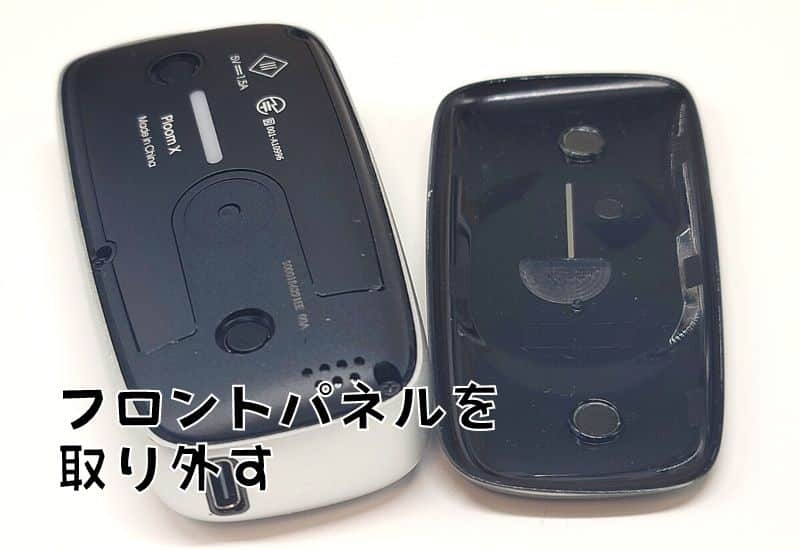
- STEP01Remove the front panel from the Plume X.

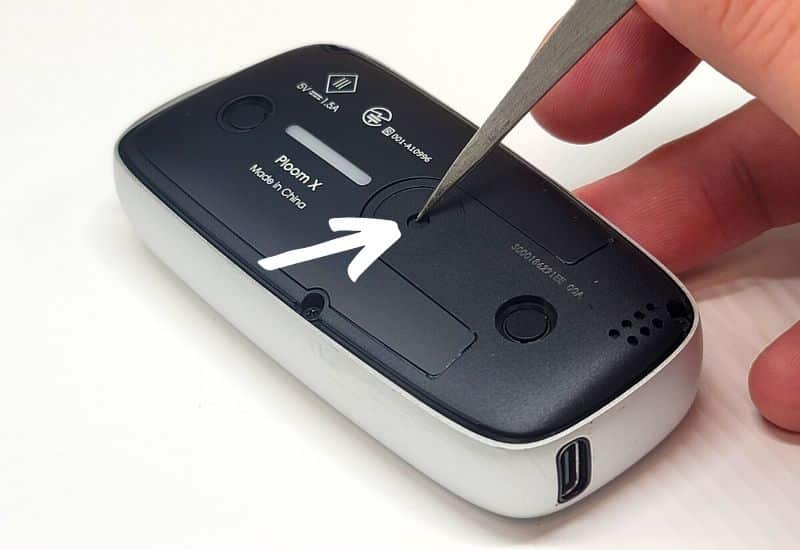
- STEP02When you remove the front panel, you will see a small hole (button) in the center, so point a ballpoint pen or the like there and press and hold.
- STEP03Press and hold for about 5 seconds, the device will vibrate and the LEDs will flash, and when they all go out, the reset is complete.
Example of a problem with Plume X that requires a reset: LED light does not blink.
It is rare, but if the LED that tells you the heating or charge level does not light up, try resetting it once.
Since it is only the LEDs that inform us of problems, we recommend that you take action as soon as possible when such problems occur.
Example of a problem with Plume X that requires resetting: no heating.
As I am sure you all will soon respond to this, but you cannot smoke if it is not heated.
If it is a minor problem, resetting will restore it, so look for a sharp tip and try resetting immediately.
Example of a problem with Plume X that needs to be reset: unable to recharge.
If you cannot charge the battery (LED does not blink) even though you are using a genuine USB cable, there is a high possibility that a malfunction has occurred and you should try resetting the battery.
However, this is not the case if you are not using a genuine USB cable, etc. Try the genuine cable first, and if that does not work, try resetting the system.
How to initialize Plume X
I also briefly touched on the beginning,Initialization of Plume XThat is to say,Bluetooth connection problemsThe procedure is designed to fix the
Initialization is a complicated procedure. Please note that there is no need to use a ballpoint pen or the like as in the case of resetting.
Please note that this knowledge is not necessary for those who do not have or will not have a Bluetooth connection, and is intended only for those who do have a Bluetooth connection.
- STEP01Open the Plume X slide.
I was only able to initialize the Plume X successfully twice after five attempts, whether it was the timing of pressing the button or the location where I was pressing it.
- STEP02Close Plume X slide(Important)
If you press the heating button eight times (last press and hold) without closing it, heating will normally start, but be careful because the behavior is similar to that of a successful initialization, so you may mistakenly think that initialization has been completed.
- STEP03Press the button area 7 times, then press and hold for 3 seconds only the 8th time.
- STEP04Vibrated twice, LED went up and down.
The video has been edited to be short, but the LED will go up and down for about 30 seconds after successful initialization. Please just be advised that it is not this short.


Example of a problem with Plume X that requires initialization: unable to connect via Bluetooth.
Plume X can now do many things by connecting to a smartphone via Bluetooth.
There are many factors, but you can't connect! Try initialization when you can't connect!
Example of a problem with Plume X that requires initialization: Plume X does not show up on Bluetooth.
To make a Bluetooth connection, the smartphone and Plume X must be paired, but since this is basically controlled by the smartphone, Plume X will appear in the smartphone's list of connected devices when the connection is normal.
I am following the Bluetooth connection procedure, but Plume X is not showing up on my phone! If this is the case, try initializing the device.
Plume X Troubleshooting
Some things can be solved by resetting, others can be solved without resetting Plume X.
Please refer to the list of troubleshooting tips we have compiled to help you decide whether or not you should reset the device.
→ Customer Center Contact Information
Plume X defect 1: LED blinks at high speed
State in which all LEDs located in the center of the device blink at high speed.
Similar behavior when the battery is low, but if all the LEDs are glowing, this is a symptom of trouble.
Reset Plume XIf the problem persists, contact Customer Service. If the problem persists, contact the Customer Center as a malfunction is likely.
Plume X failure #2: Device does not work
The device does not work when you try to heat it... This is a common occurrence, but most of this is caused by low battery power.
Open and close the slide to see how much battery power is left, so check before you rush.
Only the lower part of the LED blinks fastIndicates a dead battery, not a malfunction.
Check the remaining battery charge and recharge the battery if it seems low. If the same symptom occurs even though the battery is fully charged, call the Customer Center as there is a high possibility of a malfunction.
Plume X failure #3: Cannot be recharged
Keep in mind that there are standards for charging, and Plume-X is set at 5V/1.5A and may not charge if a low-spec or non-standard USB cable is used.
In addition, AC adapters are no longer included in the package, so you will need to provide your own. As with USB cables, there are standards, so please refer to the following.
AC Adapter Standards
Rated input: 100 VAC-240 VAC, 50/60 Hz, 0.2 A
Rated output is DC5V, 1.5A
Complies with IEC60950-1, IEC62368-1 and PSE standards
The first thing to try is to use the USB cable that comes with the Plume X starter kit. If it still does not charge at all, there is a possibility of malfunction, so please call customer center.
Plume X failure #4: Device is cold or hot.
Since it is an electronic device, it should not be used in extremely cold temperatures. (-10°C during storage, +5°C during operation)
Heat from continuous use is also common in other devices.
Proper temperature for Plume X
·during operation (e.g. of a machine, equipment, etc.)Between 5 and 35 degrees Celsius.
·When chargingBetween 5 and 35 degrees Celsius.
·In StorageBetween -10 and 45 degrees
If it is hot, cool it down. If it is cold, warm it up to the proper temperature and it can be used. However, if the product becomes hot while nothing is being done to it, it is dangerous, so stop using it immediately and contact the Customer Center.
Plume X failure #5: Bluetooth connection not possible
Bluetooth related problems such as trying to connect via Bluetooth but Plume X does not appear on the smartphone, or the Plume X is displayed and the pairing process is followed according to the instructions, but the connection cannot be made.
Please note that only problems related to Bluetooth will not be improved by trying to reset the system.
Only problems related to Bluetooth,Initialization of Plume XOtherwise, the symptoms will not improve. If the problem persists after initialization, such as not being able to connect, contact the Customer Center as there is a possibility of malfunction.
Plume X malfunction 6: Reset does not improve
In most cases, such as minor glitches, trying a reset will improve the situation, but if it still does not fix the problem, it indicates that a fatal glitch has occurred.
Therefore, there is only one option when trying to reset does not fix the problem.
If resetting the Plum X does not fix the problem, please contact Customer Center and tell them the symptoms and that resetting did not work and ask them to replace the device.
Customer Center Contact Information
We have described how to deal with each of them, but if you cannot do anything about it, the only option is to contact the Customer Center.
Please check the contact information for the Customer Center below.
You can also make inquiries through the website, so if you are not comfortable making a phone call, please use that option.
Dedicated Ploom Customer Service
Hours: 10:00 - 21:00 (except year-end and New Year holidays)
0120-108-513 Clicking on the number will issue the number.
Ploom Inquiry Form
Mail:https://www.jti.co.jp/inquiry/tobacco/ploom/input.html
Chat:https://ploom.clubjt.jp/support/
Don't forget to register your device!
Device registration facilitates smooth communication when contacting Customer Center.
Not only that, but you will also receive generous support, such as an extended two-year "product warranty" that provides free replacements in the event of malfunctions or other failures, as well as support for self-inflicted damage and loss.
This may seem like a hassle, but it can only be beneficial, so it is a good idea to consider it as well.
Plume X "Reset" and "Initialization" Summary
This article explained how to reset Plume X, how to initialize it, and general troubleshooting.
As you can see from the list of troubleshooting, there are many things that can be handled without resetting or initializing, so even when you think, "Maybe it's a problem!" Please check the symptoms and try to deal with them calmly even when you think "It might be a problem!
postscript
Reset and initialize are complicated because they both mean similar things.
Moreover, the initialization is limited to Bluetooth problems, so it is frankly of little importance.
Anyway, I hope this is useful knowledge for those who utilize Bluetooth, as it is essential to know.
In addition, JT is offering a special campaign, so if you were considering a second unit, etc., you should take a look at the official website!
Sales of Ploom X have ended.The product information and prices in this article reflect the time of writing. Current Ploom products can be checked inMOQLOG's Latest Ploom Articles. For the end of sales of Ploom X, please refer to theManufacturer's Official Noticefor more information.
Frequently Asked Questions
- QHow do I initialize Plume X?
- A
①: Open the slide
(2) Close slide
(iii): Press the button area 8 times + press and hold for 3 seconds on the 8th press only.
The main use is only for the communication part related to Bluetooth, for example, when the connection does not work, the device does not show up, and so on.
→Click here for detailed initialization procedures for Plume X.
- QHow do I reset Plume X?
- A
1) Remove the front panel and check that the LED is blinking.
(2): There is a small button on the "back of the panel." Press and hold the button with a thin object until it vibrates.
Keep in mind that the main use is for errors or problems other than Bluetooth, such as inability to heat, LED gauge flashing and unusable, etc., which require a reset.
→Click here for detailed instructions on how to reset Plume X in detail.
- QHow much does Plume X cost?
- A
It is available at Ploom stores nationwide, Ploom online stores, some convenience stores nationwide, and some tobacco retailers nationwide for 3,980 yen including tax.
- QWhat should I do if a reset does not correct the problem?
- A
If pressing the reset button does not correct the problem, contact Ploom Customer Support for assistance.
Phone number: 0120-108-513
Hours: 10:00 - 21:00 (except year-end and New Year holidays)
How Was This Flavor?
Aggregates ratings in 1 click from users aged 20 or older who have actually used the selected brand. By pressing the button, you agree that you are 20 or older and that your response will be used for anonymous aggregation. Response counts are displayed from 5 or more. Options are limited to brands registered in the product master.
1 Did not suit me — 5 Liked it
When you select a brand, the average is displayed if there are 5 or more responses.
🛠 この診断・公式リセット手順で症状は解決しましたか?
手順ごとの解決状況を匿名で集計し、機種別サポートDBの改善に活用しています。改善しない場合は無理な分解や冷却を行わず、各メーカー公式窓口へご相談ください。
 English
 日本語
 简体中文
 繁體中文
 한국어
 Français
 Español
 Deutsch
 Português do Brasil
 Italiano
 Bahasa Indonesia
 ไทย
 Tiếng Việt
 العربية
 हिन्दी
 Русский