
![[Manual] The "Correct" User Manual for Ploom X. Introduced in 3 steps with images.](https://moqlog.jp/wp-content/uploads/2021/07/ploomx-howto.png)
Good evening,Heated cigarette blogger Genki (@MOQLOG_JP)It is.
This article is about the Plume X, a high-temperature heated tobacco device in the Plume series.treatmentregardingintroductionI do.
The procedure itself is not difficult, so we will describe some points to keep in mind along with the basic flow of how to use Plum X. We hope that you will remember just that.
In addition, Plume X has a novel design that overturns conventional electronic devices, so if you try to use it without prior information, you may not know how to use it.
If you have just bought or are planning to buy, please refer to this page.
How to use Plume X
The design concept of Plume X is "Nastro," which means "ribbon" in Italian, and its beautifully curved design, which is seamless like a ribbon, has a beauty that makes people swoon when they pick it up.
But here's one thing that strikes me...No buttons (sweat) Yes, Plume has no buttons, which are always placed on electronic devices.
Even if you are familiar with heated tobacco devices,It is this "lack of buttons" that makes it difficult to understand how to operate the system without reading the user manual.
In this article, we will explain the names of the parts of the Plume X, as well as three of the minimum usage tips you should know: how to smoke, how to pull out the tobacco stick, and how to reset the stick.
- ImportantNotes on using Plume-X for the first time after purchasing Plume-X
- Plume-X is completed in 3 steps
- Plume-X Step 1: Insert a cigarette stick
- Plume-X Step 2: Press the button area.
- Plume-X Step 3: When all LED lights are on + 2 vibrations, heating is complete.
- Sign of end of smoking time for Plume-X: device vibrates once
- Summary of Plume-X usage
Introduction of Plume X part names
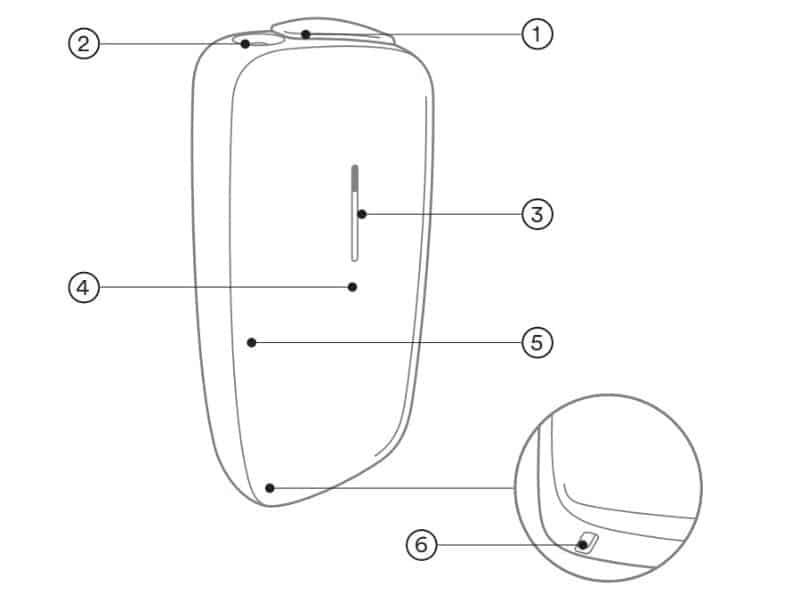
(1) Slide cover
(2) Cigarette stick insertion port
(3) LEDs
Button area
(5) Removable front panel
⑥USB Type-C cable insertion port
At the beginning of this article, I mentioned that Plume X has no buttons, but to be precise, the buttons are only hidden, but the button function remains.
The "button area" (4) in the figure corresponds to the button. Remember that heating starts when you press the area below the LED on the front panel.
Important] Points to note when using the product for the first time after purchase.

After purchase, the device is designed to turn on only when it is recharged.
Please use the USB Type-C cable included in the Plume X Starter Kit, as a different standard USB cable may not be able to charge the battery in some cases.
As the charge to the battery progresses, the LED portion in the center will extend, and when the battery is fully charged, the LED will turn off.
The device cannot be used while charging, so wait a while until charging is complete.
How to use Plume X: How to smoke
If you are wondering why there are no buttons on the device, you can use it just like any other heated cigarette device. If you know how to use it, you can use it just like any other conventional heated cigarette device.
Don't worry, this article will help you use 100%, anyone can use it!.
Before the release of the Plume X, there were rumors that the Plume X was an auto-puff device, since there was no button to be seen on the device. However, Plume X is heated by pressing a button (not visible) just like other devices.
How to smoke Plume X
- STEP01Open the slide and insert a cigarette stick

Open the slide.Insert the special "cigarette stick".The filter is printed with a colored line on it. The filter of the cigarette stick has a colored line printed on it.
- STEP02Press button area to start heating
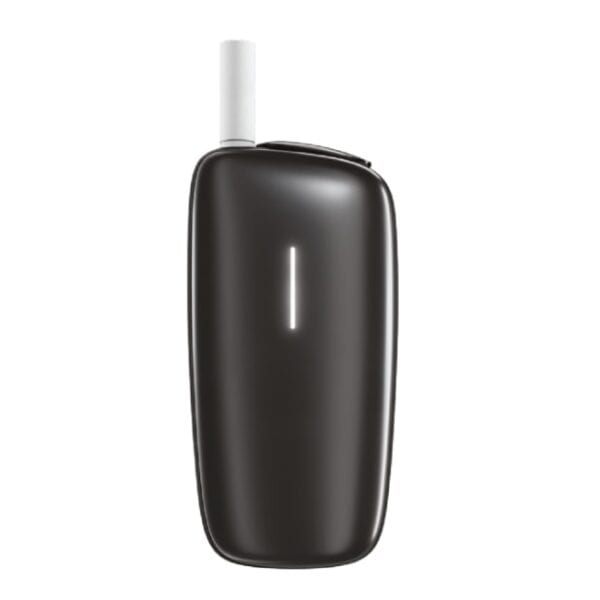
Plume X does not have no buttons, just invisible. As shown in the image, the button area is located below the LED, and heating is started by pressing this area. This area does not light up as shown in the image,Just remember, "Press below the LED to start heating.".
- STEP03After 25 seconds, all LEDs light up + 2 vibrate
When the button area is pressed, heating begins and the LED gauge rises slightly.After 25 seconds, everything lights up and the device vibrates twice, which completes the heating processEnjoy the rest of the day. Then, enjoy your cigarette time.


Cautions in Plume X smoking
- Cigarette sticks should be inserted straight and perpendicular.
- Do not insert the tobacco stick too deeply.
- Do not remove the front panel during heating or smoking
Plume X does not have a blade like Icos, but there is a risk that the tobacco stick will break off and jam inside the heater if it is forced to be inserted at an angle.
Also, please note that if the tobacco stick is inserted too deeply, it will not take in air properly and will not taste good at all due to flavor degradation and heating malfunctions.
Note that removing the front panel during heating or smoking will stop the heating process.
How to use Plume X: How to pull out cigarettes
After smoking a cigarette, you pull it out and throw it away, and here we explain how to pull the tobacco stick out of a Plum X device.
However, it is sufficient to remember only the precautions to be taken, as we are literally just doing what we are supposed to do.
The series of steps from the end of smoking to the extraction process will be explained.
How to pull out a Plume X cigarette stick
- STEP01Sign for end of smoking hours
The LED gauge in the center of the device decreases,Device vibrates once when 20 seconds of smokable time remainsThe "last 20 seconds to go" means "the heating heater will stop. It means "the heating heater will stop in 20 seconds," so enjoy the last spurt. I am glad that the smoking time of Plume-X has been extended to 5 minutes.
- STEP02Pull out the tobacco stick when finished heating.

After 5 minutes, the LED turns off slowly with vibration, and heating is finished = end of smoking.The system will inform you of the following. The same method of removing the cigarette stick should be used when inserting it, and the stick should be pulled out straight when removing it.
- STEP03Close slides and end session.
Plume X also has a slide that acts like a power source,Once you are done smoking, you can close the slide.The same is true when smoking a second cigarette in succession. It is smoother to close the slide once and then open it again to insert the second cigarette.


Notes on how to pull out the Plume X cigarette stick.
- Cigarette sticks should be pulled straight out.
- Close the slide once you have finished inhaling.
Pulling the cigarette straight out is the same as when inserting it, to prevent the tobacco stick from breaking off and clogging the heater during the process of pulling it out.
Also, when smoking two consecutive cigarettes, if you insert the second cigarette immediately after opening the slide, the button may not respond, so you can reset the overheat condition internally by closing the slide and reopening it again.
How to use Plume X: How to reset
Reset is the only first aid measure the user can take to eliminate minor glitches.
Of course, problems do not occur frequently, but the reset is used in a variety of cases, so please keep it in mind.
How to reset Plume X
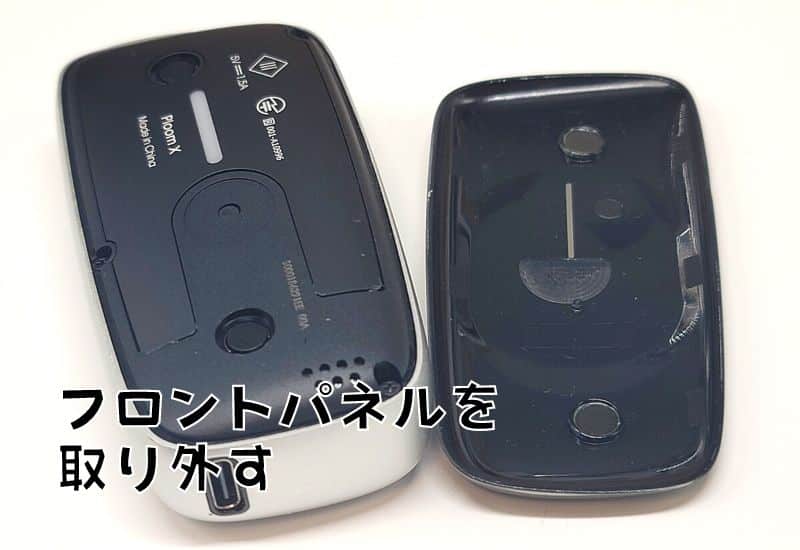
- STEP01Remove the front panel

To reset the device, the front panel of the Plume X must be removed. The front panel is only connected by magnets, so it can be easily removed.
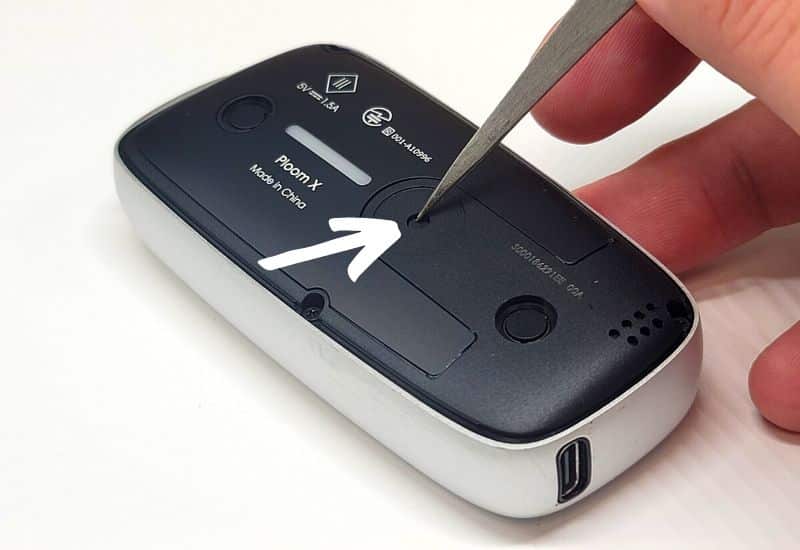
- STEP02Press and hold the small button in the center with the pointed tip.
Remove the front panel and you will see a small button in the center of the unit. Press and hold it with a pointed tip for 5 seconds to initiate a reset.
- STEP03LED flashes with vibration
When the reset begins, as shown in the video, the LED will flash fairly quickly during a long vibration. When the vibration stops and all LEDs are off, the reset is complete.
Glitch that should reset Plume X.
- LED does not blink or light up
- Not heated
- Not charging
- LED is blinking at high speed.
If something goes wrong with your Plume X device, the LED will tell you most of the time, and you should also refer to the list of flashing patterns below.
→What to do when the LED on Plume X blinks fast
In addition, only problems related to the Bluetooth connection require a first aid measure called initialization rather than resetting, so if you use Bluetooth frequently, you should also keep in mind the "initialization" summarized in the following article.
→How to reset and initialize Plume X
Plume X Contact Information
If the problem does not improve after resetting, etc., contact the Customer Center.
Dedicated Ploom Customer Service
Hours: 10:00 - 21:00 (except year-end and New Year holidays)
0120-108-513 Clicking on the number will issue the number.
Ploom Inquiry Form
Mail:https://www.jti.co.jp/inquiry/tobacco/ploom/input.html
Chat:https://ploom.clubjt.jp/support/
Summary of Plume-X usage
What do you think? It's crazy easy, isn't it?But if you know what you're doing, it's no big deal, but if you don't know what you're doing, you may not be able to heat it up, which is why I wrote this article..
I am one of them, but there are a certain number of people who say, "It's a hassle to read the instruction manual! There are a certain number of people who say, "It's a hassle to read the manual!" Please encourage them to read the manual or tell them about this page.
postscript
When I first got my Plume X, I was confused about how to use it, but now I can press the button area without even being aware of it.
Once you have the idea that this is where the button area is, it's just like any other device, but at first you may be a little hesitant to use it.
Just now,Plume X is available at less than half price (780 yen)is being implemented, so if you are considering a second unit or Plume X or Plume X debut, please exclude the official website.
Sales of Ploom X have ended.The product information and prices in this article reflect the time of writing. Current Ploom products can be checked inMOQLOG's Latest Ploom Articles. For the end of sales of Ploom X, please refer to theManufacturer's Official Noticefor more information.
Frequently asked questions about how to use Plume X
- QHow much does Plume-X cost?
- A
3,980 yen. It can be purchased at Ploom stores nationwide, Ploom online stores, some convenience stores nationwide, and some cigarette stores nationwide.
- QI do not know where the Plume-X power button is located.
- A
There is a button area around the bottom of the LED light. Pressing the button area starts heating.
- QHow many puffs in one tobacco stick?
- A
One tobacco stick can be smoked for approximately 5 minutes; there is no limit to the number of puffs within 5 minutes.
- QPlume-X is not charging.
- A
It is recommended that you use a dedicated Type C cable, as there are cases where a cable or AC adapter with a different standard will not charge the battery.
 English
  日本語
日本語  简体中文
简体中文  繁體中文
繁體中文  한국어
한국어  Français
  Español
  Deutsch
  Português do Brasil
  Italiano
  Bahasa Indonesia
  ไทย
ไทย  Tiếng Việt
  العربية
  हिन्दी
  Русский