

Regarding Sales Information at the Time of Publication:Some products and campaigns introduced in this article have now ended. Prices and availability reflect information at the time of publication.
Hello,Heated cigarette blogger Genki (@MOQLOG_JP)It is.
Today's article will be for some,VOOPOO."DRAG S/an unknownThe "software(at sentence-end, falling tone) indicates a confident conclusionHow to UpdateMemorandum onIt is.
We have already reviewed the "DRAG S", so if you are curious about what kind of vape it is, please refer to the link below.

VOOPOO "DRAG S/X" ranking system
DRAG S/X" is a pod version of VOOPOO's popular "DRAG" series vape.
The collaboration of leather and metal is a really cool pod-type vape that can be enjoyed by beginners and experts alike, and is one of the most exciting products of the year.
It can be used as it is, but the "DRAG S/X" has an interesting feature: points are added according to the number of watts used and the suction time, and the status changes.ranking systemThere is a thing called "the
However, this feature requires updating the software, and I didn't know how to do that.
I had inadvertently forgotten about it, but a reader inquired about it, so I am writing about it in a hurry.
Thank you, beprog, for letting me know. m(_ _)m
*Many people find the ranking system interesting and try to update it, but please note that updating involves risks (e.g., it stops working), not only for voopoo, so please do so with great caution.
DRAG S/X" ranking system

There are 8 ranks, starting with Iron and ending with King, which is very interesting.
Aim for the King! So let's get this system in place right away!
I thought this would be easier to understand if I laid out the images rather than a video, so I will explain the photos and supplements as I go along.
incidentallyYou need a computer to update it.so that you can open this article on your computer.
Software Update Flow
STEP01Access the official VOOPOO website (https://www.voopoo.com/)

After accessing the official website, click on the "SUPPORT" menu item.
STEP02Select the device you have updated

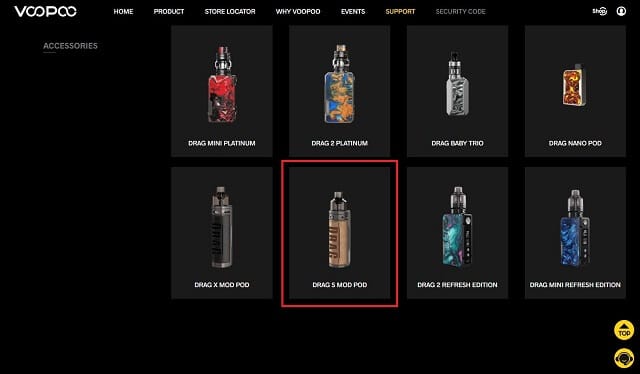
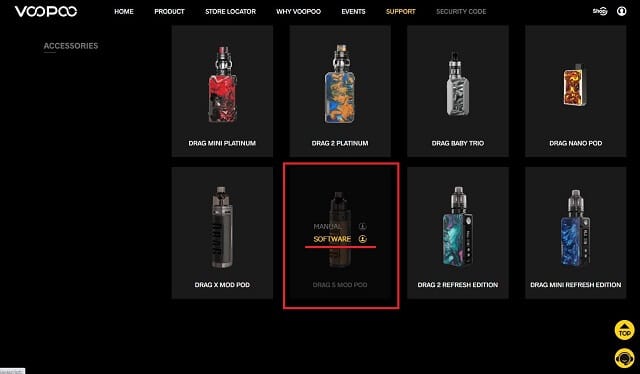
On this page you can download manuals and update files.
Scroll down and you will see VOOPOO's product lineup lined up. Move the cursor over DRAG S and click on "SOFTWARE".
*Please select from "X" if you are a "DRAG X" person.
STEP03Download Configuration software (Windows)
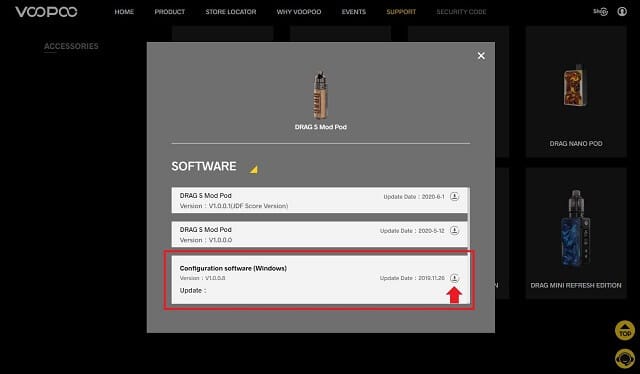
A pop-up window will appear. Download and run the "Configuration software (Windows)".
Think of this as a sort of VOOPOO setup application.
By the way, there is still something to download, so don't close the pop-up.
STEP04: VOOPOO configuration software

The configuration software will launch and the above screen will appear in its default state.
For now, once you have done this, please continue on to the next step.
STEP05Connect DRAG S to a computer

When DRAG S is connected to a computer, "VOOPOO-V1001" will appear in the upper right corner of the configuration software screen (a frame like a search window).
It may vary depending on the device you are using, but if the connection is established, the device name will be displayed here.
*Use the USB cable that comes with the product for now.
The update cannot be performed unless the battery is fully charged, so it should be performed with the battery fully charged.
STEP06Download DRAG S Mod Pod Version: V1.0.0.1 (JDF Score Version)

Once you return to the VOOPOO popup screen, download "DRAG S Mod Pod Version: V1.0.0.1 (JDF Score Version)".
This file is not a file to run, just download it.
You can save the file anywhere, but it is better to save it in a place that is easy to find because it will be loaded in the next step.
STEP07Install "DRAG S Mod Pod Version: V1.0.0.1 (JDF Score Version)" on the device using the configuration software.
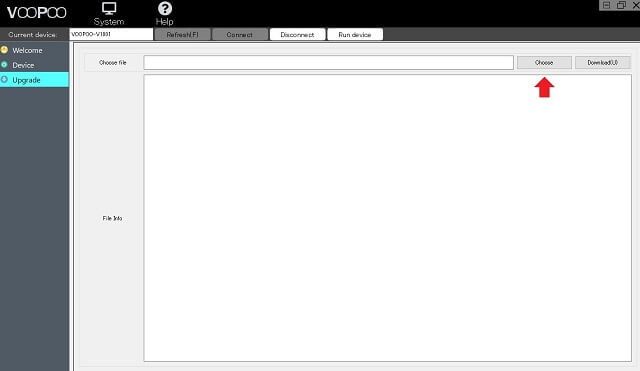


With your device connected, click on the "Upgragde" menu on the right side of the configuration software.
There is a "Choose file" item, so select "DRAG S Mod Pod Version: V1.0.0.1 (JDF Score Version)" and click "Download(U)" on the right side.
Please wait a moment while the installation starts.
STEP08When [ROM upgrade task] scuessfully is displayed in the Log status, it is completed.
![STEP08: Complete when [ROM upgrade task] scuessfully appears in the Log status](https://moqlog.jp/wp-content/uploads/2020/07/voopoo-drag-update-011.jpg)
Log" is displayed at the bottom of the setting software. If "[ROM upgrade task] scuessfully" is displayed here, installation is successfully completed.
Not that it matters, but it's spelled differently (laughs).
scuessfully → successfully
Software update process (summary)
The overall process requires first downloading and installing the VOOPOO setup software on your computer.
The update files will be loaded and installed on the software, so there is no problem if you download the update files together with the configuration software.
If you have downloaded this configuration software in the past, you should have no problem starting with the part about installing the update file, but since there are versions of the configuration software, you may want to make sure you have the latest version.
The detailed breakdown of the steps may seem daunting, but rest assured that it actually takes only one minute to complete.
Check out "DRAG S"

If you see "IRON" at the bottom of the usual screen, the update is complete.
Then you can spaz around as much as you like and keep moving up in the ranks!
When I smoked for 1.5s at 50W / 0.2Ω, it changed from 00000k to 00001k... It seems that the road to the king is long (sweat).
However, it is an interesting feature that makes you want to use it, so if you have DRAG S or X, please give it a try \(^o^)/.
Sales Information at the Time of Publication (Now Ended)
*I recommend Beprog because they have a good follow-up!
postscript
This is an interesting feature - it would be interesting if heated cigarette manufacturers adopted this feature.
For example, the number of capsules smoked and the number of cigarettes smoked will be counted, and if you accumulate enough capsules, you will receive an accessory at the official store... (laughs).
It may be difficult to introduce PlumTec and Plus because the base seems to be simple, but I think it can be done for Icos, PlumeS, and Glow.
How about a boost in sales of your exclusive cigarettes?
 English
  日本語
日本語  简体中文
简体中文  繁體中文
繁體中文  한국어
한국어  Français
  Español
  Deutsch
  Português do Brasil
  Italiano
  Bahasa Indonesia
  ไทย
ไทย  Tiếng Việt
  العربية
  हिन्दी
  Русский